
Keep model access in one place, then choose what fits the job
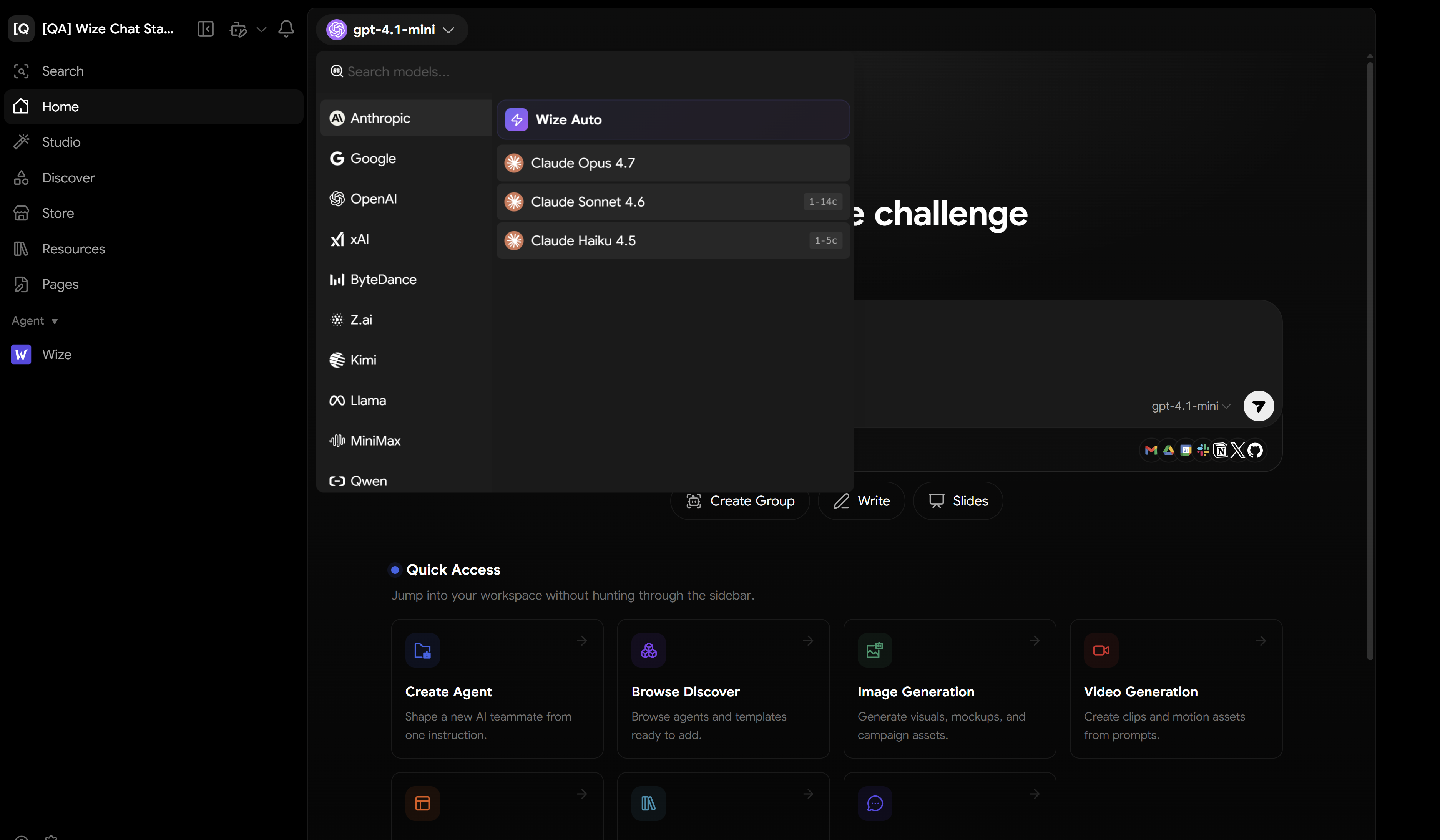
Use Claude, GPT, Gemini, local models, and custom providers in one place without dragging context across apps.
Different models are good at different kinds of work: writing, reasoning, tool use, vision, or lower-cost execution. Wize keeps provider and model access in the same place instead of turning that choice into a reason to spread the job across several tools.
Where work gets stuck
Teams using multiple models usually lose time to context transfer. The same background gets pasted around, the provider setup changes from tool to tool, and nobody is fully sure which model is active right now.
How Wize helps
Wize keeps model access, custom providers, local models, and parameter controls in one place so you can choose per task without breaking the conversation.
What you can do with it
The practical pieces people use day to day.
Keep the main providers in one place
Anthropic, OpenAI, Google, Azure OpenAI, Mistral, and other providers can live in the same app without switching tools for each one.
Switch models mid-thread
Start with one model, move to another when the task changes, and keep the same conversation intact.
Connect custom and local models too
If your team already uses Ollama or a private endpoint, it can live alongside the cloud providers instead of outside the main app.
Tune parameters where the work is happening
Temperature, token limits, top-p, and related controls stay close to the conversation instead of hiding in another console.
Keep visual work in the same interface
Use vision-capable models from the same thread when the task turns visual and needs images as part of the context.
How the workflow changes
| Topic | Before | After |
|---|---|---|
| Model access | Spread the work across separate apps just to reach different models. | Keep provider access in one place and switch as the task changes. |
| Context transfer | Retell the same background whenever the model or provider changes. | Stay in the same thread and keep the context attached. |
| Parameter control | Serious tuning means dropping into another tool or the API. | Adjust the model where the conversation already lives. |
Best fit for
Developers wiring several providers together
Useful when you need cloud models, custom endpoints, and local models to coexist in one place.
People already juggling several AI tools
Stop switching apps all day just to reach different model strengths.
Teams that need flexibility
Choose cloud providers or connect local models based on your constraints—all from one place.
Related features
AI agents you can open and actually get work moving
Pick the agent that fits the job and continue from prepared context instead of rewriting the setup every time.
Drop a file into chat and ask from the original
PDFs, spreadsheets, images, and code can be read directly so you do not have to strip them down first.
Conversation history you can actually find your way back through
Every conversation is saved, searchable, and grouped into topics so resuming work feels possible instead of lucky.